LANETALK - The #1 Bowling App - LM: Use the Exception report to find issues

Use the Exception report to find issues

THe quickest way to find and fix your weekly league issues

The Exception report helps you quickly identify and fix issues in your league setup. Follow this guide to review and resolve any exceptions. This is the recommended approach rather than checking each week independently.
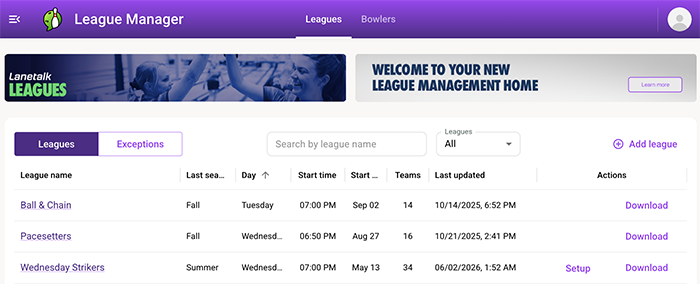
1. Go to the Start page in League Manager


This is where you’ll find an overview of your leagues and any actions needed.

2. Tap the Exceptions button


You’ll find it in the middle of the page. This opens a list of all issues detected in your leagues.

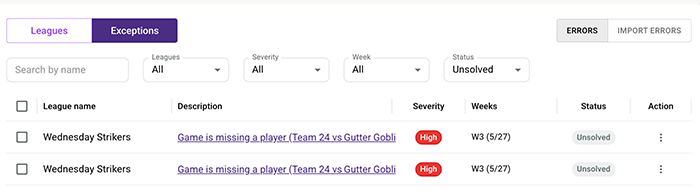
3. Filter the report


You can filter by a specific league or for example a specific week you want to focus on. This makes it easier to narrow down what needs attention.

4. Review the exception description


Each exception includes a short explanation of what’s wrong. Tap the description to jump directly to the week and match where the issue occurs. The system will open the match that contains the error so you can adjust or fix it.

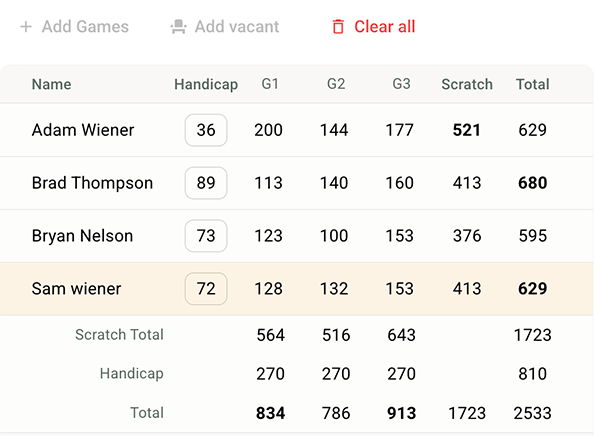
⚠️ Most common issue: Missing bowler in the roster
If a bowler is missing from the roster, the system marks it with a yellow background. Tap here to learn how to fix that: Fix missing bowlers.